
Clogged Well Screen? Why a Downhole Camera Is the First Test to Run, and the One Thing It Can't See
Well Rehabilitation AirInsights Oct 29, 2026, 10:57:38 AM AirBurst Experts 7 min read
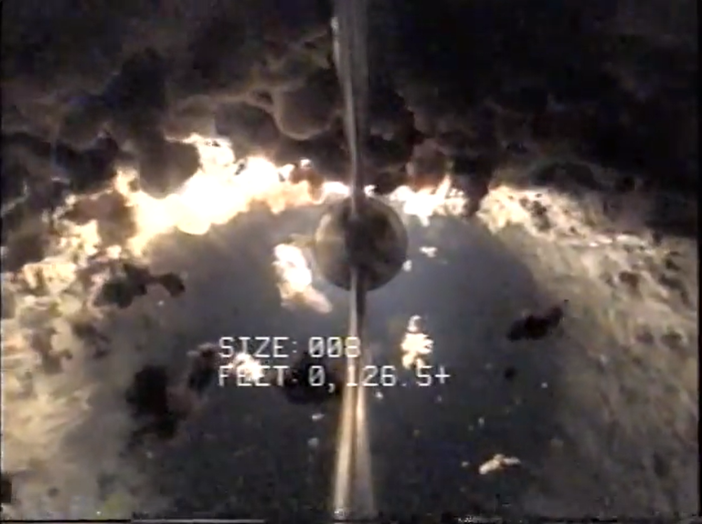
Short answer: If you suspect a clogged well screen, run a downhole video camera first. It is the cheapest, most persuasive diagnostic there is, and it shows you and the owner the encrustation, biofilm, sand, and any structural damage before anyone commits to a treatment. But a camera only sees the borehole surface. A screen that looks clean on video can sit in front of a filter pack and formation that are badly plugged. Use video to confirm and target, then rely on specific capacity, flow profiling, and, where needed, caliper and water-quality data to decide what the rehab has to reach.
Here is how to build a diagnostic ladder that finds the problem without bankrupting the owner.
What "clogged" really means
A well screen is the doorway between the formation and the pump. When operators say the screen is clogged, what is usually happening is broader than the screen itself.
As a well is pumped, three things accumulate in and around the screen: mineral scale (iron, manganese, and calcium carbonate precipitating as pumped water changes pressure and meets oxygen), sediment (fine sand and silt migrating toward the borehole and packing into the pore throats), and biofilm (iron and manganese bacteria that bloom on the mineral deposits and produce more of them). These grow together into a composite deposit that closes the slots, fills the filter pack, and chokes down the pore space in the formation.
The result is lost porosity. The formation cannot recharge the borehole fast enough to keep up with the pump, and the water level draws down further to deliver the same or fewer gallons. Falling specific capacity (pumping rate divided by drawdown) is the number that tells you it is happening. Video is how you see it.
Why video comes first
If you run one advanced diagnostic on a struggling well, make it the camera.
It is inexpensive relative to what it prevents. Compared to a rehab, a pump pull, or a new well, a camera run is cheap.
It shows the condition directly. Screen slots closed by encrustation, ropes of biofilm, sand piled over the lower screen, holes, breaks, corrosion, and collapsed intervals are all visible.
It persuades. A skeptical board member who does not understand gpm per foot understands a before-and-after image of the same screen interval: encrustation closing the slots in the first frame, open area restored in the second. Run video before and after the rehab and you have a visual proof that no chart can match.
It protects everyone. Spotting compromised areas, corroded casing, split seams, a collapsing screen, before you start is how you keep the rehab from causing structural damage. An aggressive cleaning where the casing is paper-thin can turn a routine rehab into a full reconstruction, and that is the kind of surprise that ends in a liability claim. Mapping the weak points first lets you dial the energy back where the well cannot take it, and document that you did.
How to get a video you can actually read
Decide whether to brush first. A camera reads what is on the surface. A screen caked in loose biofilm or soft debris, or a cloudy water column, can blind it. Many crews lightly brush the screen and let the well settle (or circulate clean water) before logging. The judgment call: if you want an honest as-found baseline of how bad the plugging is, log first. If you want an accurate read of the casing and screen wall itself, a gentle brushing first gives cleaner data. Just do not over-develop before the baseline, or you will erase the very condition you came to measure.
Log depth carefully. Note the depth of every feature against a documented reference (top of casing) so you can find the same interval on the after video and correlate with the flow log and well construction diagram.
Look for what is not plugging. Holes, splits, parted joints, and corrosion pitting change the treatment plan more than any amount of scale does.
The video trap: a clean screen is not a clean well
Here is the sophisticated caveat that separates pros from amateurs.
A camera only sees the borehole surface. A screen that looks shiny and clean on video can still sit in front of a formation that is badly plugged out beyond the screen, in the filter pack and the pore space you cannot see. The real problem often lives behind the surface. That is where the water actually has to travel, and it is where scale, silt, and biofilm accumulate in the highest-flow zones first.
Treat a clean-looking video as encouraging, not conclusive, and lean on your flow and capacity numbers to confirm what the camera cannot reach. If the screen looks clean but specific capacity is down 20% from baseline and drawdown is climbing, the plugging is in the formation, and the rehabilitation method has to reach it. A screen-face cleaning will produce a nice video and a disappointing pump test.
Building the diagnostic ladder
You are not obligated to run every test on every well. That is how you price yourself out of the job. Think of diagnostics as a ladder and climb only as high as the decision requires.
Rung 1: video and water quality, for almost every well
Video shows the condition. Water chemistry tells you what is driving it: iron and manganese point to biofouling and scale; hardness, pH, and alkalinity point to carbonate incrustation; silica flags a hard, glassy scale that shrugs off acid. Purge the well before sampling, because the stagnant water in an idle casing is not the aquifer.
Rung 2: flow profiling, when you need to know where
The metrics tell you how the whole well is doing. Flow profiling tells you where in the well the water is and is not coming from, which is how you prioritize zones instead of treating the entire screen blindly.
Spinner (impeller) flowmeter log. A small impeller runs down the borehole; moving water spins the blades, and the rotation rate translates to vertical flow velocity at each depth. Where flow changes as you move up the hole, water is entering, so the tool maps exactly which zones are contributing and which have gone quiet. Run it while gently pumping (a "stressed" log) to accentuate the signal. Its limitation: a conventional spinner tends to stall at low velocities, so it works best in reasonably productive holes.
Read the profile as a series of steps. A sharp rise in net flow at a given depth marks a strong contributing zone. A long, near-vertical stretch is formation that has gone quiet, and those quiet intervals in what used to be productive screen are the ones to treat first.
Dye-tracer dynamic profiling. A more sensitive cousin injects a trace of NSF-approved dye at various depths while the well pumps at steady state, and measures how it returns to calculate the percentage of flow contributed by each zone, under real operating conditions, without pulling the pump. Beyond plugging, it can pinpoint which zones are pulling in a contaminant, which sometimes lets an operator sleeve off a bad zone and cut treatment costs instead of treating the whole stream.
Most of the time a clean well is better than a dirty well, and you should only skip rehab on specific zones if there is a good reason. But knowing which intervals are dead tells you where to concentrate energy.
Rung 3: caliper log, when integrity is in question
A caliper log runs mechanical fingers (or acoustic sensors) down the casing and screen to measure the internal diameter precisely, revealing corrosion, holes, scale thickness, and physical deformation. On a well of uncertain age or condition, an integrity check before hammering on it is cheap insurance, and it tells you exactly where to ease off so you do not turn a rehab into a reconstruction. Like the camera, it reads the surface, so brush first if you want the pipe rather than the gunk.
Rung 4: deposit and biological analysis, when biofouling is suspected
Water chemistry samples the water. Biological and biochemical analysis samples the deposit: material scraped off the screen, solids caught from the discharge, or biofilm grown on a coupon left in the well, then cultured for iron-related bacteria, sulfate-reducers, and slime-formers. The water tells you the risk; the deposit tells you what you are actually chipping off. A biofouled well needs a treatment aimed at the biology, not just a mineral-scale approach.
Rung 5: zone-specific sampling, when one interval is the problem
A single sample from the discharge is a blend of every zone the well pumps. Straddle-packer sampling isolates a discrete interval between two inflatable packers; depth-specific grab samples target set depths; dye profiling pairs zonal flow with water quality. Zone-specific data is what lets you treat, or sleeve off, the problem interval instead of the whole well.
Spend the customer's money where it changes your decision.
Confirm it is the well, not something else
Before the camera even goes down, a good project manager has ruled out two other suspects. A worn pump shows normal drawdown and healthy specific capacity but cannot make its numbers; vibration, noise, sand in the discharge, or a sudden collapse in amps point mechanical. A declining aquifer shows falling static water levels and neighboring wells fading too. A plugged well shows deepening drawdown and falling specific capacity with a sound pump and healthy neighbors. On an older well it is often more than one.
From diagnosis to fix
Once video, chemistry, and the numbers agree that the well is plugged, the treatment has to match what you found:
- Surface scale and soft biofilm on a sound screen, specific capacity only slightly down: brushing and surging may be enough, followed by a pump test to prove it.
- Carbonate scale and biofilm with specific capacity well down: mechanical breakup deep into the pack and formation, with or without chemistry matched to the deposit, then removal.
- Plugging confirmed by the numbers but the screen looks clean: the problem is in the formation. Choose a method that delivers energy past the screen. Air impulse rehabilitation sends precisely timed pressure pulses through the screen and filter pack into the formation to fracture scale and shear biofilm without chemicals, then the loosened material is pumped or airlifted out.
- Structural damage found: stop, re-scope. Sleeve, patch, or reconstruct before any high-energy work, and adjust energy zone by zone where the casing is thin.
Then run the after video and the after pump test the same way you ran the before. Specific capacity at the same rate from a rested well is the number that proves the screen, and the formation behind it, are open again. Judge the job by that improvement multiplied by how long it lasts.
Get the full field guide
This article is adapted from The Data-Driven Well Rehab, AirBurst's free 60-page field guide for project managers: how to diagnose whether it's the pump, the well, or the aquifer; how to run a pump test you can trust; and how to prove a rehab's results in specific capacity, wire-to-water efficiency, and dollars.